This Week in AI: Real-Time Video Upscaling, Selective Editing That Actually Works, and Why Open-Source Training Just Got Smarter
The transition from 2025 to 2026 wasn't a slow week. While most of the industry took time off, open-source AI labs shipped tools that solve production problems agencies face daily.
Real-time video upscaling that runs on single consumer GPUs arrived. Image and video editors that only touch the pixels you want changed—leaving watermarks, logos, and brand assets intact—became production-ready. The best open-source image generator for realistic photos with perfect text rendering dropped. DeepSeek published the training architecture that explains why open-source keeps closing the gap with closed models. A 40-billion parameter coding model beat Claude 4.5 on agentic benchmarks while running on hardware you can buy today. Two separate tools made image and video generation 4-100x faster.
Here's what shipped while the calendar flipped.
StreamDiffVSR: When Video Upscaling Became Real-Time
Video upscaling has existed for years. The problem is it's always been prohibitively slow for production workflows. Traditional diffusion-based upscalers take hours to process minutes of footage. StreamDiffVSR just made that irrelevant.
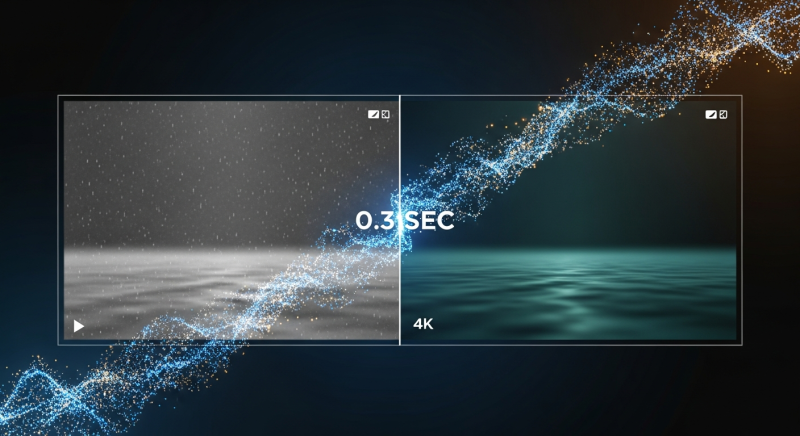
This new model upscales video in real-time on a single RTX 4090. A process that previously took 4,600 seconds now completes in 0.3 seconds. That's not an exaggeration—the demo video shows side-by-side comparisons where the traditional diffusion upscaler processes one frame while StreamDiffVSR finishes the entire clip.
The quality improvements are substantial. Feed it shaky iPhone footage with compression artifacts and motion blur, and it outputs sharp 4x upscaled video with restored detail. Cluttered scenes with multiple people and objects—the kind that usually confuse upscaling algorithms—come out coherent with individual elements properly defined. The model handles camera shake, low lighting, and compression artifacts without introducing the typical AI upscaling artifacts like over-sharpening or haloing.
The technical breakthrough is efficiency optimization. Instead of running full diffusion steps for every frame, StreamDiffVSR uses temporal redundancy—it processes frames in intelligent chunks, reusing computation across similar frames while maintaining consistency. This cuts processing time by orders of magnitude without sacrificing quality.
The deployment story matters as much as the technology. GitHub repo is live with full instructions for local setup. The model runs on 24GB VRAM, which means any agency with an RTX 4090 can process client footage in real-time during meetings. No cloud upload, no API costs, no waiting overnight for renders. The code for training is also scheduled for release.
Use case is obvious: clients send unusable footage shot on phones or pulled from low-resolution sources. StreamDiffVSR makes it production-viable in seconds. The "we can't use this footage" conversation just became "give us 30 seconds to upscale it."
The Editing Revolution: SpotEdit and ProEdit Change How Regional Edits Work
Two separate tools dropped this week that solve the same core problem with different approaches—both change how image and video editing workflows function at the fundamental level.
SpotEdit is the precision tool. Unlike existing image editors—including Nano Banana, GPT Image, and Qwen ImageEdit—that regenerate entire images when you make regional changes, SpotEdit only modifies the specific pixels you've targeted. You want to change a soccer ball to a sunflower? It edits only the ball region. Add a person to a landscape? It touches only the pixels where the person appears. Everything else—watermarks, logos, background elements, brand assets—remains pixel-perfect identical to the original.
This matters more than it sounds. Current regional editing tools introduce subtle inconsistencies across the entire image even when you're only changing one element. Colors shift slightly. Lighting changes. Textures get regenerated with minor variations. For agency work where brand guidelines require exact color matching or where client logos must remain untouched, these tools create compliance problems. SpotEdit solves this by treating edits as surgical interventions, not full regenerations.
The architecture uses two components: a spot selector that identifies which pixels need changing, and a spot fusion module that blends edits seamlessly with unchanged regions. It works with both Flux and Qwen ImageEdit as base models. GitHub is live. VRAM requirements match the base model—Qwen has 8GB quantized versions available, making this accessible on consumer hardware.
ProEdit takes a different approach—one unified model that handles both image editing like Nano Banana and video editing with the same interaction model. Select a region in a video, type your edit, generate. Add a roof rack to a moving car. Change a deer into a cow while maintaining the original motion and pose. Turn a red car black across an entire clip. The model handles temporal consistency automatically, so edits don't flicker or drift across frames.
The limitation is color saturation—ProEdit tends to boost colors and contrast noticeably compared to source footage. For some use cases this is fine. For client work requiring color accuracy, it's a problem. But the workflow efficiency is undeniable. Traditional video editing requires trimming, masking, tracking, replacing, and color grading across multiple tools. ProEdit collapses that into one step with natural language.
Both tools have GitHub repos with code releasing soon. For agencies, the strategic question is which workflow fits better: surgical precision that preserves everything except your target (SpotEdit), or unified image/video editing with minor quality tradeoffs (ProEdit). Both are production-ready today.
Qwen Image 2512: When Text Rendering and Realism Finally Work Together
Alibaba's Qwen team has been on a tear. Last week they dropped Qwen ImageEdit 2511—the best open-source Nano Banana alternative. This week they released Qwen Image 2512, an image generator that solves two problems every other model struggles with: realistic photos that don't look AI-generated, and text rendering that actually works.
The realism improvement is immediately visible. Previous versions of Qwen Image produced photos with that telltale AI aesthetic—overly smooth skin, plasticky textures, too-perfect lighting. The new version generates images that pass as authentic photography. Skin has pores and texture variation. Lighting looks natural with proper falloff. Materials have realistic surface properties. The "this looks AI" tell is gone.
Text rendering is where Qwen Image 2512 actually pulls ahead of competitors. Most image generators handle short text snippets—a few words on a sign or product label. Long paragraphs cause catastrophic failures with misspellings, garbled letters, and nonsense words. Qwen Image 2512 can render multiple sentences of perfectly spelled, grammatically correct text in context. A diary page with a full paragraph? It gets every word right. A mobile app UI with navigation labels, buttons, and content? All text elements render accurately.
Benchmark performance backs this up. Qwen Image 2512 beats Z-image on the standard image quality leaderboards despite Z-image being the previous open-source leader. Prompt following is more accurate—complex multi-element requests get executed correctly where competitors miss details or hallucinate elements.
The model ships with 2-bit quantized versions that run on 8GB VRAM with full Comfy UI integration. This makes it immediately deployable on consumer hardware. For agencies, the use case is straightforward: client mockups with realistic product photography and perfect text rendering, generated locally in seconds. No stock photo licensing, no photoshoot scheduling, no typesetting in Photoshop after generation.
The limitation is artistic range. Qwen Image 2512 is optimized for photorealism. Abstract art, illustrations, or stylized renders don't work as well—Z-image Turbo handles those better. But for the 80% of agency work that needs "realistic photo with this product and this text," Qwen Image 2512 is now the default choice.
Why Open-Source Keeps Winning: DeepSeek's Training Breakthrough and IQuest's Coding Upset
Two separate releases this week explain why open-source models keep closing the gap with—and sometimes surpassing—closed alternatives that cost $200/month to access.
DeepSeek published a paper on manifold-constrained hyperconnections (MHC), which sounds obscure but represents a fundamental training architecture improvement. Here's what it does in plain terms: traditional neural networks pass information layer by layer like a single-lane highway. Residual connections add shortcuts so earlier information doesn't get lost—think of them as on-ramps that bypass congestion. Hyperconnections take this further, creating a multi-lane superhighway where information flows through many parallel paths simultaneously.
The problem with hyperconnections is chaos. With too many information pathways merging and splitting, training becomes unstable and crashes. DeepSeek's solution is manifold constraints—mathematical rules that act like traffic controllers, ensuring information flow remains balanced across all pathways. This keeps training stable even with massive parallel information flow, which means models learn more efficiently with better performance.
The practical result: open-source labs can now train larger, more capable models with the same compute budget. This is why models like DeepSeek R1 can match or beat GPT-4 on reasoning tasks despite being trained with a fraction of OpenAI's resources. The training efficiency gap between open and closed models just narrowed significantly.
IQuest Coder demonstrates what this enables in practice. This 40-billion parameter model trained by a Chinese quant trading firm (similar structure to DeepSeek's backing) just beat Claude 4.5 on SWEBench Verified—the gold standard benchmark for agentic coding tasks. The original claimed score of 81.4% was inflated due to benchmark contamination, but even after re-evaluation, it scored 76.2%, placing it third globally behind only the largest closed models.
This is remarkable because Claude 4.5, GPT-4.5, and Gemini 3 Pro are hundreds of billions to over a trillion parameters. IQuest Coder is 40 billion. It fits in a 4-bit quantized version at 22GB, which runs comfortably on an RTX 4090. The training method is clever—it learned from GitHub commit history, studying how code changes over time across real repositories. This taught it to understand edits, debugging patterns, and long-term project structure better than models trained only on static code snapshots.
The two releases together tell the same story. Open-source isn't catching up through brute force—throwing more compute at larger models. It's catching up through architectural innovations that make training more efficient and data strategies that extract more signal from available sources. DeepSeek's MHC makes training better. IQuest's commit-history approach makes data better. Together they explain why a 40B open model can rival trillion-parameter closed alternatives.
For agencies, the implication is strategic. The performance gap between "expensive cloud API" and "runs on your hardware for free" is closing faster than expected. IQuest Coder already handles agentic coding tasks at Claude-level quality while running locally. How long until the same happens for creative workflows?
Speed Demons: TwinFlow and HiStream Make Waiting Obsolete
Two separate acceleration methods dropped this week that address the same bottleneck—AI generation is still too slow for real-time client workflows. Both solve it, but for different models and use cases.
TwinFlow is the image acceleration plugin. It works specifically with Z-image Turbo, currently one of the best open-source image generators for realistic photos. Standard Z-image workflow requires 7-9 diffusion steps to generate an image, which on consumer hardware takes about 7 seconds. TwinFlow cuts this to 1-2 steps, reducing generation time to 1-2 seconds. That's a 4-5x speedup with minimal quality loss.
The technical approach is step reduction through distillation. TwinFlow learns to approximate what 7-9 steps would produce in just 1-2 steps. It's not skipping steps—it's collapsing the diffusion process into fewer, more efficient iterations. The model is already available on Hugging Face. The limitation is Comfy UI integration isn't released yet, so most users are waiting for that before deploying it.
HiStream tackles video generation, specifically for Alibaba's VOne model—currently the best open-source video generator but painfully slow on consumer hardware. Generating a 5-second clip takes 5+ minutes on standard GPUs. HiStream speeds this up by 107x, bringing generation time down to 2-3 seconds.
The acceleration works through two methods. First is temporal redundancy elimination—instead of processing every frame independently, HiStream uses an "anchor-guided sliding window" that fixes the first frame as reference and only processes motion changes in subsequent frames. This keeps memory usage constant regardless of video length. Second is spatial compression—it generates a rough low-resolution version first, then upscales using cached features from the initial pass. This is faster than generating at full resolution from the start.
The surprising result: HiStream videos often look better than standard VOne outputs despite being 107x faster. The quality-speed tradeoff went the right direction—faster and better. The catch is HiStream comes from Meta and is currently "under legal review," which in Meta's history often means it won't actually get released. If it does ship, it changes video generation workflows entirely. If it doesn't, it's another case of Meta announcing impressive research that never becomes usable.
For agencies, the pattern is clear. Image generation is approaching instant—1-2 seconds makes it viable for live client meetings where you iterate on concepts in real-time. Video generation is heading the same direction if HiStream releases. The constraint shifts from "how long does generation take" to "how fast can we iterate on prompts." That's a fundamentally different workflow.
Two More Tools Worth Watching
HY-Motion 1.0 is Tencent's text-to-3D animation model. Give it a natural language description of movement—"person walks forward while looking left and right," "character collapses after being hit"—and it generates realistic 3D character animation. It handles props (sword swings, gun handling, shield blocking) and complex multi-step sequences. The training dataset covered 3,000+ hours of motion capture data across 200+ motion categories, then fine-tuned with reinforcement learning from human feedback.
The model requires 24-26GB VRAM, which fits on an RTX 4090. Quantized versions will likely bring this down further. Use case for agencies: 3D animation workflows without motion capture studios or animator teams. The limitation is it only generates motion data, not rendered video—you still need 3D software to apply the animation to characters and render final output.
SpaceTimePilot lets you change camera angles and movements in existing video footage. Take any video and prompt it to pan differently, zoom, orbit, or generate bullet-time freeze effects where the camera moves around a frozen moment. It works by reconstructing the 3D scene from source footage, then re-rendering from new camera perspectives while preserving motion and expression detail.
The model can even generate novel views from dashcam footage—take a forward-facing car camera video and synthesize side-view perspectives. The accuracy isn't high enough for safety-critical applications, but for creative work it enables post-production camera control that previously required reshoots. The code is under internal review, so release timing is uncertain.
Both tools represent the same trend: post-production capabilities that used to require specialized studios or expensive reshoots becoming software problems solvable on consumer hardware.
What Agencies Do Next
The week between Christmas and New Year wasn't slow. It was productive.
Real-time video upscaling that handles client's bad footage. Selective editing tools that preserve brand assets pixel-perfect while changing everything else. Image generation with realistic photos and perfect text rendering. Training architectures that explain why open-source keeps beating expectations. Coding models that rival Claude while running locally. Acceleration methods that make image generation instant and video generation viable for client meetings.
The pattern across all of these: production problems getting solved by open-source tools that run on hardware you already own, with zero API costs and complete data privacy.
The agencies that deploy StreamDiffVSR this week can salvage unusable client footage in real-time. The teams that integrate SpotEdit or ProEdit into workflows can iterate on regional edits without regenerating entire assets. The shops that switch to Qwen Image 2512 can deliver client mockups with perfect text rendering without Photoshop cleanup. The developers who run IQuest Coder locally can ship agentic coding tasks without $200/month API subscriptions.
These aren't future capabilities. They shipped last week. The competitive advantage goes to whoever deploys them first.
Bangkok8 AI: We'll show you how to start 2026 productively—whilst your competitors are still nursing their 2025 hangovers.